
Nodi’s engine, in your workflow
Nodi SDK is the engine behind Nodi, packaged as a library. Model with implicits and B-Rep, run stress, thermal and flow analysis without building a mesh, and turn the results into supports, toolpaths and reports — from your own code, on your own machines.
What exactly is Nodi SDK?
A library that calls Nodi’s geometry engine directly, without going through the node graph. What you would wire up as nodes — implicit fields, booleans, meshing, analysis, supports, G-code — becomes a function call, so a study you prototyped in the editor can run as a script, as a batch, or inside your own application.
import nodi_sdk as sdkp = sdk.Point3.new# a box with rounded edges, shelled to a 1.5 mm skinbody = sdk.Implicit.box_shape(80, 40, 12).offset(-2.0).offset(2.0)skin = body.shell(1.5, sdk.ShellDirection.Inward)# a gyroid infill with 8 mm cellslo, hi = p(-40, -20, -6), p(40, 20, 6)cells = sdk.CellMap.rectangular_bounded(8, 8, 8, lo, hi)gyroid = sdk.Implicit.tpms(sdk.TPMSType.Gyroid, cells, 0.0, 0.6)part = skin.union(gyroid.intersection(body))# mesh on the GPU to within 0.15 mm, then savegpu = sdk.ImplicitMesher.create()mesh = gpu.mesh_with_tolerance(part, 0.15, True, 0.5, 0.0, [])open("bracket.stl", "wb").write(mesh.to_stl_bytes().to_bytes())What can it model?
Implicit and B-Rep, in one hybrid kernel we wrote from scratch. Implicits take on the shapes B-Rep struggles with, and B-Rep keeps the exact faces your drawings and fixtures depend on. The two combine directly within a single model.
Implicit
- TPMS and beam lattices whose thickness follows a field
- Voronoi structures, smooth and chamfered booleans
- Any shape you can write as a distance function
B-Rep
Exact solids, built feature by feature, imported and exported as STEP and IGES.
-
Extrude
-
Revolve
-
Loft
-
Sweep
-
Union
-
Difference
-
Intersection
-
Fillet (2D)
-
Chamfer (2D)
-
Offset (2D)
Speed up your workflow with meshless simulation
The solvers are immersed: the part sits inside a background grid, so there is no conforming mesh to generate or repair. Change the geometry and run it again — analysis keeps pace with modeling. For the final analysis, you can also connect to the solver you already use.
- Static stress
- Static thermal
- Thermal stress
- Flow, Stokes or Navier–Stokes
- Thermal flow
- Topology optimization
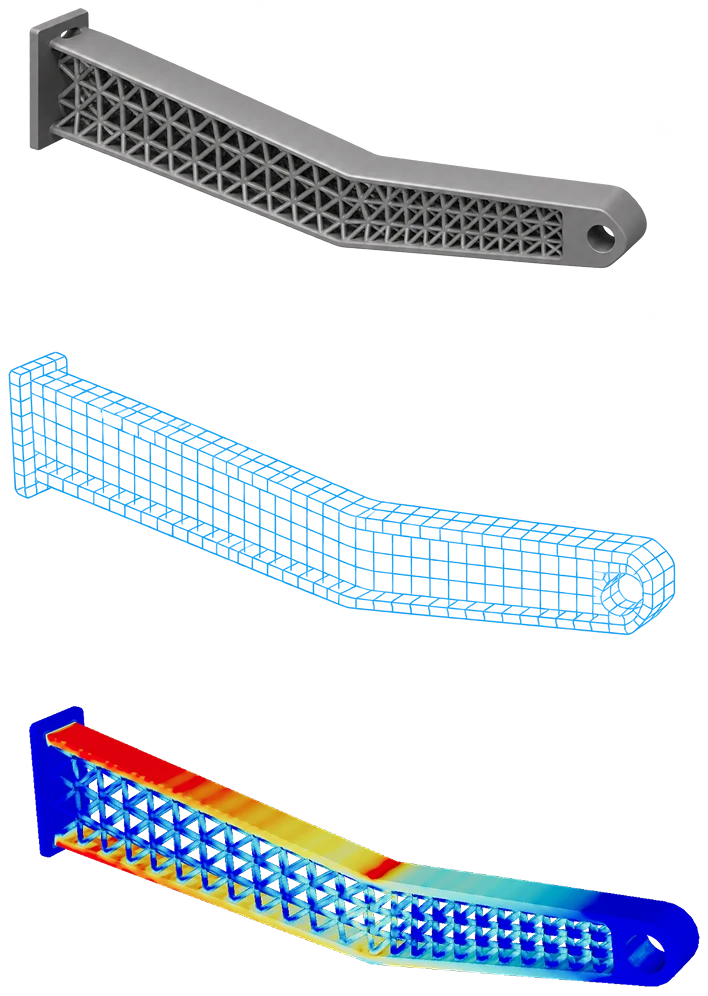
Set the boundary conditions Get the FEM result instantly
More questions
04 Will the SDK give the same answer as the Nodi app?
Yes. It runs the same engine.
05 How do I run hundreds of analyses?
Hand them to an agent. The SDK gives it everything an analysis produces — data, screenshots and the rest — and the agent filters, colors and charts the results into something you can read at a glance, so you explore more designs in less time.
06 Can my AI agent use it?
Yes. The SDK is ordinary code, so Claude Code, Codex or a local model can write a script, run it, read the numbers and try again. With a local LLM, the work can also run securely, without exposing confidential data to anything outside your environment.
Connect an AI agent07 Do I need to replace my CAD or CAE software?
No. Nodi SDK reads and writes the formats your tools already use, so it can sit between them: bring geometry in from CAD as STEP, optimize or analyze it, and hand back STEP, meshes or G-code.
08 Does it need a GPU?
Not necessarily. It supports NVIDIA CUDA, though, so with a GPU, modeling and analysis run with far more power.
09 Where does my data go?
Nowhere you don’t send it. The SDK runs inside your own process, on your workstation or your servers, so models and results stay on your premises.
10 How do I get access, and what does it cost?
Nodi SDK is in early access. Tell us what you want to build and we’ll come back to you with access and terms for your project.
Tell us what you want to build
We’re working with early teams on support generation, toolpaths and design exploration. Share your use case and we’ll get you set up.
Request access